
March 22, 2026
Formidable Forms: Mastering Immigration Compliance Paperwork
Formidable Forms: Mastering Immigration Compliance Paperwork
Why Every Employer Must Understand the Immigration Compliance Form
The immigration compliance form — formally known as Form I-9 — is a federal requirement that every U.S. employer must complete for every new hire, without exception.
Here is a quick overview of what you need to know:
What it is: Form I-9, Employment Eligibility Verification, issued by the U.S. Department of Homeland Security (DHS) through USCIS.
Who must complete it:
-
All U.S. employers
-
All employees hired after November 6, 1986
Key deadlines:
-
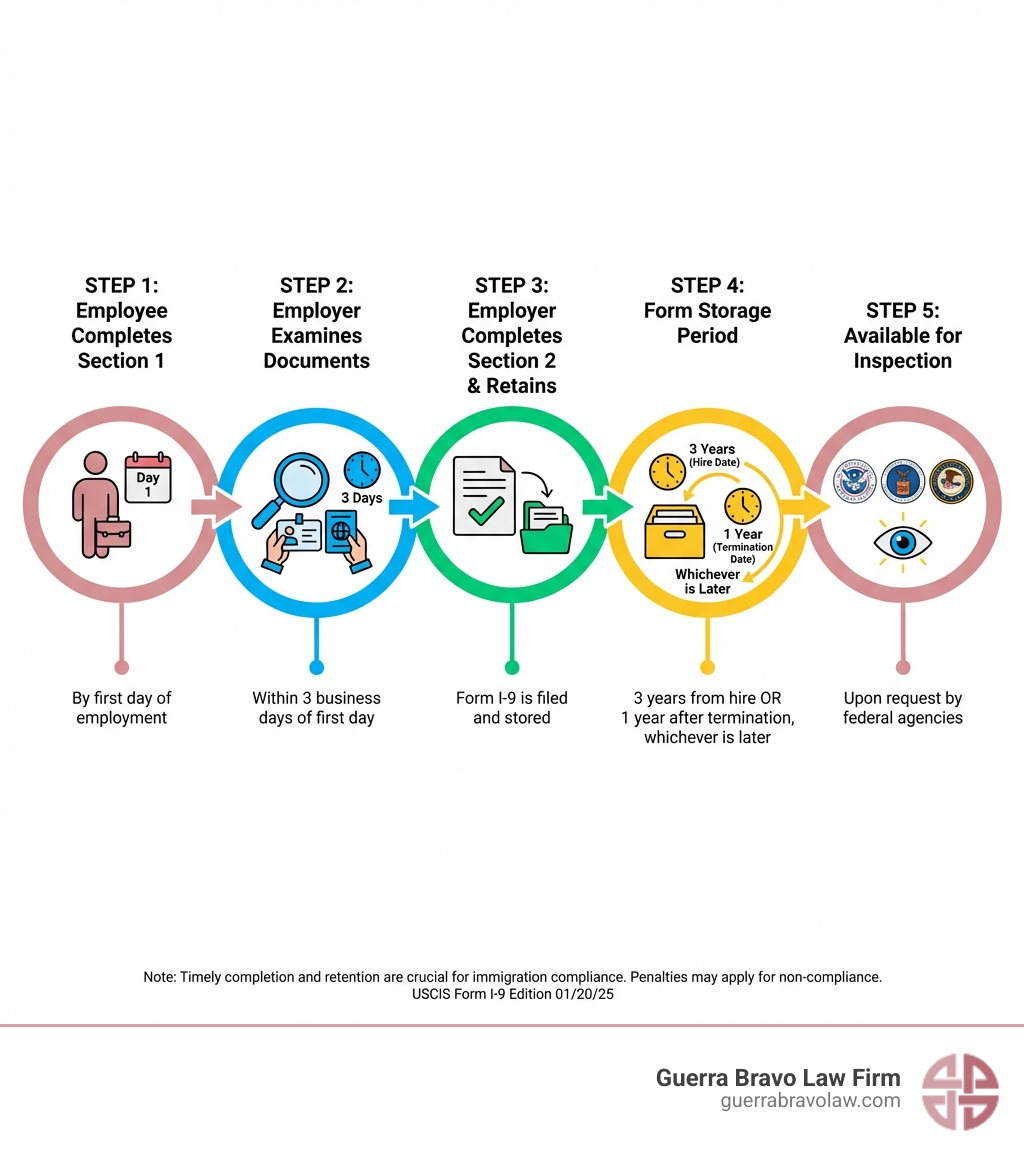
Employee (Section 1): Must be completed no later than the first day of employment
-
Employer (Section 2): Must be completed within three business days of the employee’s first day
How long to keep it:
- Three years after the date of hire, or one year after termination — whichever is later
What happens if you don’t comply:
- Civil fines, audits, and potential criminal charges under the Immigration and Nationality Act (INA)
The Immigration Reform and Control Act (IRCA), signed into law in 1986, created this requirement. Its goal was simple: make sure every person working for pay in the United States is legally authorized to do so.
That sounds straightforward. But in practice, it’s not.
There are strict deadlines, specific acceptable documents, multiple form sections, electronic system rules, state-level requirements, and a real risk of costly penalties — even for honest mistakes.
Whether you are an HR manager, a small business owner, or someone trying to understand your rights as an employee, getting this right matters. DHS enforcement agencies like Homeland Security Investigations (HSI) actively audit employers. Fines can reach tens of thousands of dollars per violation.
This guide walks you through everything — from filling out the form correctly to surviving an audit.
The Foundation of Employment Eligibility: Form I-9
When we talk about an immigration compliance form, we are almost always talking about Form I-9. It is the bedrock of worksite enforcement. Since November 6, 1986, every single employer in the U.S. (including those right here in McAllen and the Rio Grande Valley) has been legally required to verify the identity and employment authorization of every person they hire.
The form has evolved over the years. The most current version (edition 01/20/25) is designed to be more streamlined, but the legal weight it carries remains heavy. You can find the Official Form I-9 Download on the USCIS website.
The Structure of the Form
Form I-9 is currently divided into two primary sections and two supplements:
-
Section 1: Employee Information and Attestation The employee fills this out to swear, under penalty of perjury, that they are authorized to work in the U.S.
-
Section 2: Employer Review and Verification The employer (that’s you!) examines the employee’s documents and records the details.
-
Supplement A: Preparer/Translator Certification Used if someone helps the employee complete Section 1.
-
Supplement B: Reverification and Rehire Used if you rehire someone within three years or if an employee’s work authorization expires and needs to be updated.
Completing Your Immigration Compliance Form: Section 1 and 2
Timing is everything. If you miss the windows for completion, you are technically in violation of federal law from day one.
Section 1: The First Day Rule The employee must complete Section 1 no later than their first day of employment. They can actually complete it any time after they have accepted a job offer, but never before the offer is made (to avoid discrimination claims).
Section 2: The Three-Day Rule As the employer, you have a bit more breathing room—but not much. You must complete Section 2 within three business days of the employee’s first day of work. For example, if Joe starts on Monday, you must finish Section 2 by Thursday.
The Physical Examination Requirement Generally, you must physically examine the original documents the employee provides. You aren’t expected to be a forensic document expert, but you must determine if the documents “reasonably appear to be genuine” and relate to the person presenting them. If you are a participating employer in E-Verify, there are now “alternative procedures” that allow for remote examination, which we will discuss later.
For a deep dive into the nitty-gritty of how to fill every box, we always recommend keeping the Handbook for Employers M-274 bookmarked on your computer.
Acceptable Documents for Identity and Authorization
You cannot tell an employee which documents they must bring. Doing so is considered “document abuse” and can lead to discrimination lawsuits. Instead, you must provide them with the “List of Acceptable Documents” and let them choose.
THE DOCUMENT CATEGORIES
List A: Documents that Establish Both Identity and Employment Authorization If an employee provides one item from List A, they are done.
-
U.S. Passport or Passport Card
-
Permanent Resident Card (“Green Card”)
-
Employment Authorization Document (EAD/Work Permit)
List B: Documents that Establish Identity ONLY If they don’t have a List A document, they must provide one from List B AND one from List C.
-
Driver’s license issued by a State or outlying possession
-
ID card issued by federal, state, or local government agencies
-
School ID card with a photograph
List C: Documents that Establish Employment Authorization ONLY
-
A Social Security Account Number card (unless it says “Not Valid for Employment”)
-
Consular Report of Birth Abroad
-
Original or certified copy of a birth certificate
The Receipt Rule Sometimes an employee has lost their document. They can present a “receipt” for the application of a replacement document. This is valid for 90 days, after which they must show the actual replacement.
Navigating the Immigration Compliance Form Audit Process
The mere mention of an “ICE audit” is enough to keep any business owner up at night. In our experience, especially with attorney Iris Guerra Bravo’s 14+ years of insider knowledge at ICE and DHS, preparation is the only way to stay calm during an inspection.
The process usually begins with a Notice of Inspection (NOI). When HSI (Homeland Security Investigations) serves an NOI, the clock starts ticking immediately. You typically have only three business days to produce all the Forms I-9 requested.
If you aren’t organized, those three days will disappear in a flash. HSI will look for:
-
Missing forms
-
Missing signatures
-
Expired documents that weren’t reverified
-
Fraudulent documents that should have been caught
If HSI finds issues, they may issue a “Notice of Intent to Fine” (NIF). At this stage, you have the right to a hearing. For more information on how these legal battles are fought, you can look into Information on OCAHO hearings.
Correcting Errors on an Immigration Compliance Form
Not all mistakes are created equal. The law distinguishes between “technical/procedural” failures and “substantive” violations.
Technical vs. Substantive
-
Technical Failures: These are minor “oops” moments, like forgetting to put the date in the right format or missing a zip code. If HSI finds these, they are required by law to give you at least 10 business days to fix them.
-
Substantive Violations: These are the big ones. Missing signatures (either from the employee or the employer) or failing to complete the form at all. These cannot simply be “corrected” to avoid a fine after an audit has started.
How to Correct Properly If you find an error before an audit, fix it! But do it the right way:
-
Draw a line through the incorrect information (do not use white-out!).
-
Enter the correct information.
-
Initial and date the change.
-
If a whole section was missed, complete it and add a note explaining why it was done late.
A “good faith” effort to comply can often help mitigate penalties if you are ever audited.
Civil Penalties and Fine Calculations
Fines for immigration compliance form violations are not just a slap on the wrist. They are calculated based on the number of violations and adjusted annually for inflation.
Fine Factors Under Section 274A of the INA, the government uses a matrix to decide how much to charge you. They look at:
-
The size of your business (smaller businesses might get a break).
-
Your “good faith” effort to comply.
-
The seriousness of the violation.
-
Whether the employee was actually an unauthorized alien.
-
Your history of previous violations.
Each factor can increase or decrease the fine by about 5%. Currently, fines for paperwork violations can range from hundreds to thousands of dollars per form. If you have 50 employees and every form has a substantive error, you could be looking at a six-figure bill. You can track the latest Inflation adjustments via the Federal Register.
Modernizing Verification: E-Verify and Remote Procedures
In the old days, you had to sit across a desk from every new hire. In today’s world of remote work and digital offices, things have changed.
E-Verify Requirements and Best Practices
E-Verify is a web-based system that compares information from an employee’s Form I-9 to records available to the U.S. Department of Homeland Security and the Social Security Administration.
While E-Verify is voluntary for most employers, it is mandatory for federal contractors and in certain states. Even if it’s not required for your McAllen business, many employers use it for the added peace of mind it provides.
The TNC (Tentative Non-Confirmation) Sometimes, E-Verify returns a “Tentative Non-Confirmation.” This doesn’t mean the person is illegal; it just means the data didn’t match.
-
DO NOT fire the employee immediately.
-
DO notify the employee and give them the chance to contest the finding.
-
DO follow the steps in the E-Verify User Manual to resolve the issue.
Remote Document Examination As of 2023, employers who use E-Verify and are in good standing can use an “alternative procedure” to examine documents remotely via a live video call. You must still see the original documents, but you don’t have to be in the same room. You must check the box on the I-9 indicating you used an alternative procedure.
State-Specific Compliance: The Georgia Example
While we focus on Texas law, it’s important to see how other states handle compliance to understand the complexity of the landscape. For instance, Georgia has very specific rules under O.C.G.A. § 13-10-91.
In Georgia, any contractor or subcontractor working on a public contract must provide a notarized affidavit swearing they use E-Verify. Subcontractors have to forward these notices up the chain within five business days. This shows that “compliance” often goes beyond just the federal I-9 form and can involve state-level affidavits and notarized pledges. While Texas doesn’t have an identical statute for all private contracts, staying ahead of these trends is vital for any growing business.
Document Fraud and Retention Standards
Filling out the form is only half the battle. Storing it correctly is the other half.
Retention Rules for Terminated Employees
You can’t just throw away a Form I-9 the moment someone quits. There is a specific “Retention Period” formula you must follow. You must keep the form for:
-
Three years after the date of hire, OR
-
One year after the date employment is terminated,
-
Whichever is LATER.
Example: If you hire someone and they work for you for 10 years, you must keep their I-9 for 11 years total (10 years of work + 1 year after they left).
Storage Formats You can keep forms in paper, microfilm, or electronic format. If you choose electronic storage, the system must be secure, have an indexing system for easy retrieval, and prevent unauthorized changes.
Document Fraud and INA § 274C
Section 274C of the Immigration and Nationality Act makes it illegal to forge, counterfeit, or alter documents for the purpose of satisfying I-9 requirements. It also makes it illegal to accept a document that you know is fake.
If the government finds evidence of document fraud, they can issue “Cease and Desist” orders and impose separate civil penalties for each fraudulent document. This is where having a “battle-tested” legal strategy is essential. We’ve seen cases where honest employers were duped by high-quality forgeries. Proving you acted in good faith is your best defense.
Regarding privacy, any biometrics collected (like fingerprints for certain visa-related background checks) are protected. For more on this, see the FBI Privacy Act Statement regarding biometrics.
Frequently Asked Questions about Immigration Compliance
How long must I keep a Form I-9 after an employee leaves?
As mentioned, you use the “3 years from hire / 1 year from termination” rule. We recommend keeping a “tickler file” or a digital alert system to know exactly when you can safely shred these documents. Shredding them too early is a violation; keeping them too long can sometimes increase your liability during an audit if you have old forms with errors.
Can I use a Spanish version of the Form I-9?
In the 50 states (including Texas), you must use the English version of the form to officially document the verification. However, USCIS provides a Spanish version that you can use as a translation tool to help employees who don’t speak English. The only place where the Spanish version can be used as the official form is Puerto Rico.
What happens if I miss the three-day deadline for Section 2?
First, don’t panic—but don’t ignore it either. Complete the form as soon as possible. Do not backdate the form. Use the current date and, if your system allows, attach a short memo explaining why the verification was late (e.g., “Administrative oversight, corrected immediately upon discovery”). This shows “good faith,” which can help reduce fines if you are audited later.
Conclusion
Mastering the immigration compliance form isn’t just about checking boxes; it’s about protecting the future of your business and your employees. Between the three-day rules, the document lists, and the threat of HSI audits, it’s easy to feel overwhelmed.
At Guerra Bravo Law Firm, we specialize in taking the “formidable” out of these forms. With offices in McAllen, Brownsville, and throughout the Rio Grande Valley, we are your local experts in worksite enforcement and immigration law.
Our secret weapon? Attorney Iris Guerra Bravo. With over 14 years of insider experience working with ICE and DHS, she knows exactly what auditors are looking for because she’s been on the other side of the table. We don’t just give generic advice; we provide battle-tested, individualized strategies for businesses facing complex compliance challenges.
Don’t wait for a Notice of Inspection to find out if your paperwork is in order. Whether you need an internal audit, help with E-Verify, or a defense against a Notice of Intent to Fine, we are here to help.
For More info about worksite enforcement services and how we can protect your business, contact us today. Let’s make sure your compliance is as solid as your work ethic.
[